
DMZ
Hints & Tips
Loot rarity, playing solo and crafting, the stuff the game doesn't spell out.
Loot & rarity
Every item is colour-coded by rarity, from grey up to red. Higher rarity usually means a better version or more cash, but the colour doesn't tell you what to do with an item. That depends on its class, below.
- CommonTier 1
Frag Grenade · Smoke Grenade · Armor Plate · Gas Can · Steel Dog Tag
- UncommonTier 2
Bandage · Stim · 1-Plate Armor Vest · Small Backpack · Rigid Synthetics
- RareTier 3
2-Plate Armor Vest · Medium Backpack · Armor Box · Radiation Blockers · CPU
- EpicTier 4
Medkit · 3-Plate Armor Vest · Large Backpack · UAV · Cipher Code Ledger
- LegendaryTier 5
Self-Revive Kit · Revive Pistol · Parachute · Hazmat Suit · Military Composites
- UltraTier 6
Gold Bar · Door Breacher Charge · Tempered Armor Vest · Secure Scavenger Backpack
Item classes
Keep = extract and stash it · Secure = put it in a Secure Slot · Use = gear for the run · Depends = read the note
Resources
KeepSynthetics, Electronics, Chemicals and Metals. Everyday junk you pick up is broken down into these automatically.
They sit in their own pouch and don't take Stash slots, so there's nothing to manage. Just extract.
Ingredients
KeepNamed 3D Printer parts like Binding Catalyst, Biomaterials, Rigid Synthetics and Reactive Metals. They don't break down.
They take backpack slots and only count once extracted. Move them to the Stash after exfil. Commanders drop the prized ones.
Valuables
DependsGem-icon items worth DMZ Cash: files, ledgers, dog tags, up to the $25K Gold Bar.
Some are also needed for FOB upgrades, so check before you sell. Selling past your Bank cap wastes the cash.
Keys
SecureOpen a specific room, locker, safe or bunker. The key's description names its grid square.
Put keys in a Secure Slot so you keep them if you go down before reaching the door. Look them up on the Hajin map.
Consumables
UseBandages, Medkits, Energy Drinks, Pain Killers, Radiation Blockers and the Self-Revive Kit.
A Medkit fixes the Tourniquet wound. A Self-Revive is the single best item to carry solo.
Plate carriers
UseArmour vests from 1-Plate up to the Ultra Tempered Armor Vest.
Printable from Uncommon upwards, so don't risk a big run in a 1-plate if you can print a 2-plate.
Backpacks
UseSmall, Medium, Large, plus Scavenger, Weapon and Secure variants. Without one you get 8 slots.
Medium and Secure packs have Secure Slots. Anything outside them is lost on a failed exfil.
Tacticals & lethals
UseSmokes, flashes, stims, frags, throwing knives, C4, claymores, drill charges.
Throwing knives (and suppressed guns) keep kills quiet, which keeps your threat level down.
Field upgrades & fire support
UseAmmo and Armor Boxes, Revive Pistol, Fulton Drop Marker, UAVs, Care Packages.
Field upgrades don't recharge in DMZ: one use each, so time them.
Gear
UseNVGs, gas masks, Hazmat Suit, parachutes.
Bring NVGs for dark interiors like the Mall, and a gas mask or Radiation Blockers when you're heading into gas or radiation.
Recipes & Weapon Manuals
KeepUnlock a 3D Printer recipe or a gun at the Gunsmith.
Used up automatically when you extract with them, and each pays 5,000 DMZ Cash too.
Kits & dog tags
DependsSurvival Kits and contracts you open at the FOB, and dog tags from rival Operators and bosses.
Open kits at the FOB for crafting materials. Dog tags sell, and some feed upgrades.
Playing solo
How to play solo in DMZ
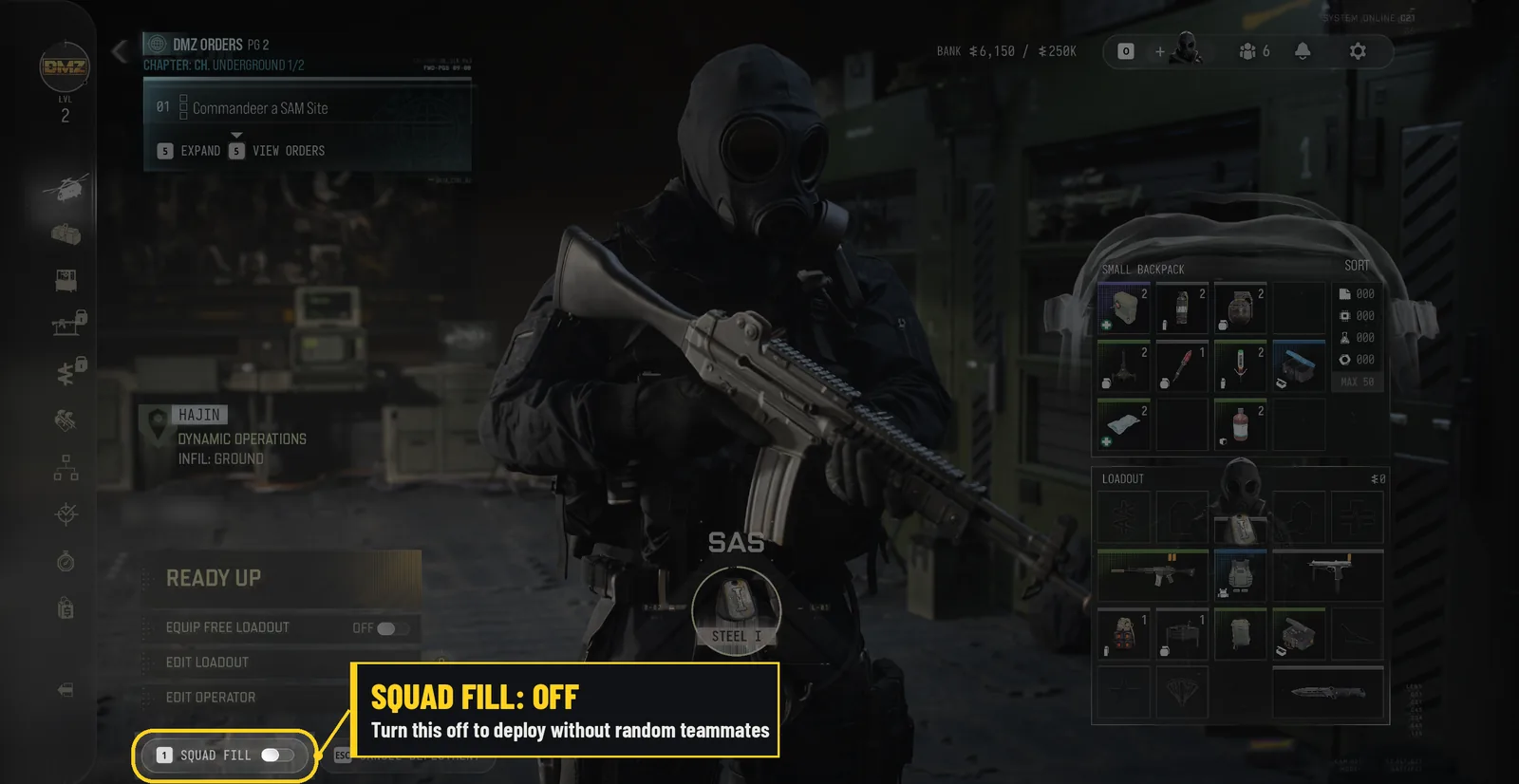
There's no solo mode as such, just a setting you need to switch off. At the FOB, pick your deployment (story mission, dynamic op or free roam), then your infil. That brings up the Ready Up screen with your operator, your inventory and the free loadout option.
In the bottom left corner there's a small toggle labelled Squad Fill. Turn it off and you'll drop in without random teammates. It's easy to miss, so it's worth checking every time you deploy.
Going solo has a few perks. Everything you find is yours, so there's no fighting over who takes the good stuff. It's also much easier to stay quiet. One person sneaking past AI patrols, or another squad, draws far less attention than three people running about. And you can do whichever missions and ops you like, rather than whatever someone else picked.
It's not all good news, though. Some of the missions and bosses are tough, and that's where having a squad really helps. With decent gear and a bit of patience you can still solo most of them, but there's no shame in switching Squad Fill back on for the harder ones.
One thing to remember: turning Squad Fill off only means no teammates. Other squads are still in the match with you, so play it like you're outnumbered, because you usually are.
Solo tips
1Make friends mid-match
Use the Ping Wheel to request a truce or join another squad (squads can grow to four), and Proximity Chat to talk them round. It works both ways, so they can hear you too.
2Stay quiet, stay low threat
Watch the Stealth Meter and break line of sight or go prone when it starts filling. Killing AI after you're spotted raises your threat stars. At five you get drones and hunt squads, so if stars climb, leave. Start in Low and Medium threat areas on the Hajin map.
3Bring a way back up
Everyone has the Tourniquet: get back up at the cost of max health until you use a Medkit. Carry a Self-Revive in its own slot. Traits worth a look solo: Possum, Thermal Padding (hidden from UAVs), Die Hard and Metabolism.
4One goal per run
Pick one thing (an ingredient you're short of, a key you hold, an Order step) and go home once it's done. Read Order checklists exactly: locating a Lieutenant isn't the same as killing one.
5Cheap runs when you're rebuilding
Use the Free Loadout after a bad loss. Anything you extract with is yours to keep, and you've got nothing to lose.
6Read the signs
Crows or vultures circling a body can mean a squad just won a fight nearby. Every player you kill raises your bounty, which makes you a target.
7Exfil like you mean it
Clear the area before calling the heli, pick a site with cover, keep a second exfil in mind and leave before the radiation storm closes in. A Fulton Balloon is the quickest way out.
Not sure where's quiet? The Hajin map shows the threat level of every area. Start in the Low and Medium zones and work up.
Crafting
Crafting happens at the FOB's 3D Printer between deployments. Loot breaks down into Resources as you go. You then spend those, plus rarer named Ingredients, on gear, consumables and permanent FOB upgrades.
Where
The 3D Printer at the FOB, unlocked at DMZ level 2. It prints gear, consumables, ingredients and FOB upgrades, but not guns.
What it needs
Every print needs the recipe unlocked, plus Resources (Synthetics, Electronics, Chemicals, Metals) and often named Ingredients.
Unlocking recipes
Most start locked. Unlock them by levelling DMZ, finishing Orders, or extracting with a recipe you looted. Looted recipes are used up on exfil, add themselves to the printer and pay 5,000 DMZ Cash.
Tracking
Pin (track) a recipe or ingredient and matching loot shows a pin icon in the field, so you know what to grab.
Printing
Choose how many to print, then send them to the Stash or equip them straight onto an Operator.
Field Crafting
The Scout trait lets you craft from Common Resources mid-deployment.
Known recipes
Starter recipes are ready from DMZ level 2. The rest unlock as you level, finish Orders or extract a looted recipe.
| Item | Type | Cost |
|---|---|---|
| Energy Drink(Common) | Consumable | 10 Chemicals, 10 Metals |
| Bandage(Uncommon)Starter | Consumable | 15 Synthetics, 15 Chemicals |
| Pain Killers(Uncommon) | Consumable | 15 Electronics, 15 Chemicals |
| Sedative Inhaler(Uncommon) | Consumable | 15 Synthetics, 15 Chemicals |
| Radiation Blockers(Rare) | Consumable | 15 Electronics, 15 Chemicals |
| Medkit(Epic)Starter | Consumable | 30 Chemicals, 1 Binding Catalyst, 5 Biomaterials |
| Self-Revive Kit(Legendary) | Consumable | 5 Biomaterials, 3 Binding Catalyst |
| Door Breacher Charge(Ultra) | Consumable | 1 Stock Rod |
| 1-Plate Armor Vest(Uncommon)Starter | Plate carrier | 25 Synthetics, 25 Metals |
| 2-Plate Armor Vest(Rare)Starter | Plate carrier | 50 Synthetics, 5 Reactive Metals |
| Tempered Armor Vest(Ultra) | Plate carrier | 2 Military Composites, 4 Ballistic Fabric, 10 Rigid Synthetics |
| Small Backpack(Uncommon)Starter | Backpack | 25 Synthetics, 25 Metals |
| Medium Backpack(Rare)Starter | Backpack | 50 Synthetics, 5 Rigid Synthetics |
| Small Secure Backpack(Epic) | Backpack | 50 Metals, 10 Rigid Synthetics, 3 Structural Alloy |
| Secure Scavenger Backpack(Ultra) | Backpack | 2 Military Composites, 4 Nylon Laminate, 10 Reactive Metals |
| Armor Box(Rare) | Field upgrade | 1 Reactive Metals |
| Revive Pistol(Legendary) | Field upgrade | 2 Power Regulator, 3 Binding Catalyst, 5 Detonators |
| Disposable Parachute | Gear | 1 Rigid Synthetics |
| Bomb Glider | Other | 1 Stock Rod |